
Hybrid Meetings
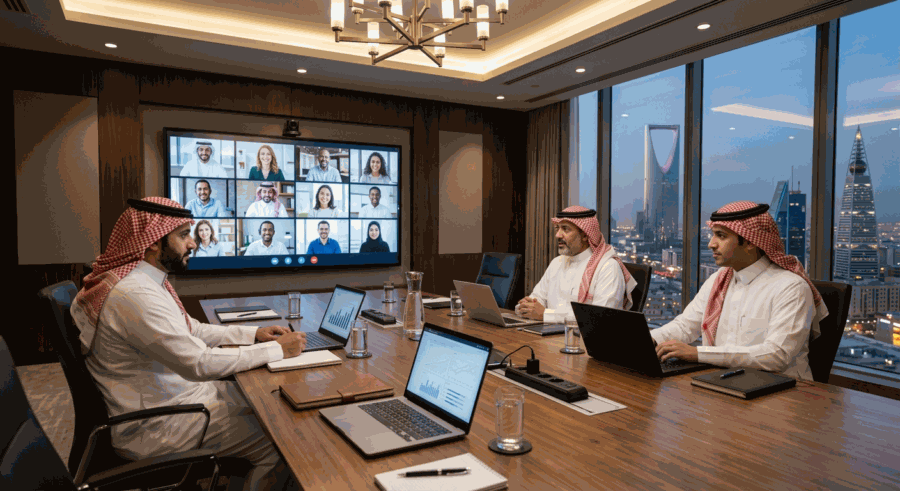
Hybrid Meetings Challenges and How to Overcome Them, Achieving Fairness Among Attendees
First: Introduction
The hybrid meeting is the most difficult and complex form of meeting. It is neither an in-person meeting nor an electronic meeting, but a complex mix of both. Some participants are physically in the room, others attend remotely. The core challenge: how do we ensure equal participation, effective communication, and sound decisions in this composite environment? Hybrid meetings have become necessary not optional for many companies today. The flexibility of combining physical presence with remote participation is valuable, but it comes with real challenges: remote attendees feel like second-class citizens, physical attendees tend to discuss among themselves ignoring the screen, technology may confuse communication. This article reviews how to design and manage effective hybrid meetings that achieve fairness among all.
Second: Why Is the Hybrid Meeting a Challenge?
1. The Different Dynamics Challenge
Physical and remote attendees experience two different experiences:
- Physical attendees: side discussions, non-verbal cues, room energy.
- Remote attendees: screen, sound, limited image, delay.
- Result: two meetings within one meeting.
2. The Participation Fairness Challenge
Remote attendees tend to participate less:
- Difficulty entering the discussion.
- Sound delay confuses contributions.
- Physical attendees talk more.
- “Absent effect” — remote attendees are forgotten.
3. The Technical Challenge
Technology for hybrid meetings is complex:
- Cameras capturing all attendees.
- Microphones capturing all sounds.
- Screens for seeing remote attendees.
- Platforms dealing with both.
4. The Management Challenge
The facilitator manages two dynamics at once:
- Movement in the room.
- Contributions on screen.
- Coordination between the two.
- Ensuring balanced participation.
Third: Common Mistakes
1. Ignoring Remote Attendees
The most common mistakes:
- Facilitator looks only at physical attendees.
- Side discussions not heard remotely.
- Physical contributions flow, electronic ones falter.
- Result: remote attendees become “followers” not “participants.”
2. Poor Technology
- Microphone not capturing some sounds.
- Camera showing one angle only.
- Poor sound quality.
- Screen in a corner not everyone sees.
3. Absence of Protocols
- No rules for who speaks when.
- No mechanism for requesting the floor.
- No balance in time allocation.
4. Not Training Participants
- Physical attendees don’t understand the necessity of “waiting.”
- Remote attendees don’t dare to contribute.
- Facilitator not trained on this type.
Fourth: Successful Hybrid Meeting Design
1. The Fundamental Principle: “Remote First”
Design the meeting as if everyone is remote, then add the physical attendees:
- This ensures everything remote needs is available.
- Physical attendees use the same tools.
- Equality in experience.
- No difference between presence and distance.
2. Each Participant on a Screen
Even physical attendees join from their personal devices:
- Everyone sees everyone equally.
- No difference in visual experience.
- Using same platform tools (chat, raise hand).
- Eye contact with camera.
3. Individual Microphone
Instead of one microphone in the room:
- Each participant has personal microphone (headset).
- Clear sound for all.
- Knowing who is speaking.
- No distracting sounds from the room.
4. Specialized Hybrid Facilitator
The facilitator’s role is more important and difficult:
- Follows everyone with the same attention.
- Attentive to remote signals.
- Manages time for all parties.
- Creates balanced atmosphere.
Fifth: Technical Setup
1. For the Room
1.1 Cameras
- 360-degree camera (captures everyone).
- Or multiple cameras with different angles.
- Camera that automatically tracks the speaker.
- High quality (1080p or 4K).
1.2 Microphones
- Ceiling microphones for the room.
- Microphone for each participant (if possible).
- Echo cancellation processing.
- High quality.
1.3 Screens
- Large screen to display remote attendees.
- Screen to display documents.
- In location visible to everyone in the room.
- High quality.
1.4 Speakers
- Good room speakers.
- Clear sound from all angles.
- Volume adjustment.
2. For Remote Attendees
- Same regular electronic meeting requirements.
- Good camera.
- Clear microphone.
- Fast internet.
- Quiet environment.
3. Meeting Platform
- Platform supporting hybrid meetings.
- Advanced features (display customization, audience management).
- High quality for sound and image.
- Stability and reliability.
Sixth: Before the Meeting
1. Comprehensive Testing
- Testing all equipment an hour before.
- Testing from in-person and remote sides.
- Ensuring sound and image quality from all angles.
- Testing screen sharing.
2. Distributing Guidelines
2.1 For Physical Attendees
- Respecting remote attendees’ role.
- Waiting to speak.
- Speaking clearly.
- Using microphone.
- Looking at camera sometimes.
2.2 For Remote Attendees
- Joining early.
- Checking sound and image.
- Using platform tools effectively.
- Full focus.
3. Facilitator Preparation
- Time schedules for each item.
- List of remote participant names.
- Strategy for balanced participation.
- Technical emergency plan.
Seventh: During the Meeting
1. Opening
1.1 Unified Welcome
- Welcome including all with same warmth.
- “Welcome, present with us or joining remotely.”
- Introducing attendees from both sides.
1.2 Setting Rules
At meeting start, reminder of rules:
- Using “raise hand” to request the floor.
- Waiting until speaker finishes.
- Microphone muted when not speaking.
- Camera on.
2. Managing Participation
2.1 Distributing the Floor
Facilitator deliberately balances:
- After each in-person contribution, calls for remote.
- “What do our remote colleagues think?”
- Call by name for those who haven’t spoken.
- Ensuring remote can hear side contributions.
2.2 Managing Silence
- Remote attendees are more silent.
- Direct question opens the door.
- Pause a minute after each question.
- Using platform tools (polls, chat).
2.3 Preventing “Side Talk”
In the room, side discussions may occur:
- Facilitator stops them politely.
- “Let’s share this with everyone.”
- Respecting remote experience.
3. Presentations
3.1 Screen Sharing
- All participants see the same screen.
- Sharing from presenter’s device.
- Not just a presentation on room screen.
3.2 Clarification
- Using visual pointer for everyone.
- Focusing on what’s being discussed.
- Enlarging text.
4. Facilitating Discussion
4.1 Breakout Rooms
- For discussions in small groups.
- Balanced allocation (in-person and remote in each room).
- Facilitator for each room.
4.2 Polls
- To obtain everyone’s opinion.
- Equally available to all.
- Instant results.
4.3 Collaborative Whiteboards
- Miro, Mural, or Jamboard.
- Everyone contributes.
- Visible to all.
Eighth: Two-Category Participants
1. Physical Attendees
1.1 Responsibilities
- Respecting remote attendees.
- Speaking clearly.
- Using microphone.
- Looking at camera sometimes.
- Avoiding side discussions.
1.2 Risks
- Drifting into discussions among in-person attendees.
- Ignoring the screen.
- Speaking with low voice.
- Using signals remote can’t see.
2. Remote Attendees
2.1 Responsibilities
- Active participation.
- Using “raise hand.”
- Full focus.
- Communicating via chat.
- Requesting clarification when needed.
2.2 Risks
- Attention distraction.
- Hesitation in contributing.
- Feeling excluded.
Ninth: Common Challenges and Their Solutions
1. The “Forgotten Screen” Challenge
In-person attendees engage in discussion and forget remote:
- Solution: large central screen in the room.
- Facilitator turns to it regularly.
- “Let’s hear from remote colleagues.”
- Periodic review: who participated?
2. The “Bad Sound” Challenge
In-person attendees not heard well remotely:
- Solution: good microphones.
- Speaking clearly.
- Testing before starting.
- Asking remote attendees about sound quality.
3. The “Contribution Race” Challenge
In-person attendees are faster in contributing:
- Solution: “raise hand” system for all.
- Facilitator manages turn strictly.
- Short pause before each new contribution.
- “Wait, we have a raised hand.”
4. The “Side Moment” Challenge
Quick discussions in the room:
- Solution: rule “everything said is heard by everyone.”
- Facilitator interrupts politely.
- “Let’s share this.”
5. The “Broken Technology” Challenge
Technical disruptions during meeting:
- Solution: available technical support.
- Alternative plan (phone, messages).
- Patience with problems.
- Testing before meeting.
Tenth: Measuring Hybrid Meeting Success
1. Success Indicators
- Balanced participation between in-person and remote.
- Sound and image quality throughout meeting.
- No complaints of exclusion.
- Clear decisions.
- Time respect.
- Satisfaction of all participants.
2. Post-Meeting Evaluation
Asking all participants:
- Did you feel like a real participant?
- Is your experience equal to others?
- What can be improved?
- Technical aspects needing attention?
3. Continuous Improvement
- Periodic surveys for participants.
- Trying new tools.
- Updating technology.
- Training facilitators.
Eleventh: Special Cases
1. Hybrid Board Meeting
Additional considerations:
- Accurate attendance documentation (in-person or remote).
- Voting unified for all.
- Closed sessions inclusive of remote.
- Information confidentiality.
2. Large Hybrid Meeting
100+ participants:
- Different design.
- Professional facilitator.
- Strong interaction tools.
- Strict protocols.
- Extensive polls.
3. International Hybrid Meeting
Across time zones:
- Simultaneous translation if needed.
- Respecting participants’ times.
- Providing recording for absentees.
Twelfth: Best Practices
1. At Design Level
- “Remote first”: Design with remote perspective.
- “Every person on screen”: Unified experience.
- Excellent technology: Cameras, microphones, screens.
- Specialized facilitator: In managing hybrid.
2. At Management Level
- Balance in participation: Between in-person and remote.
- Clear protocols: For contributions.
- Using tools: For interaction.
- Following participation: And intervening when needed.
3. At Culture Level
- Respect for remote: Like respect for in-person.
- Inclusion culture: In every decision.
- Continuous improvement: Based on feedback.
- Investment: In technology and training.
4. At Technology Level
- Professional equipment: Not consumer technology.
- Regular maintenance: To ensure readiness.
- Technical support: Available during meetings.
- Alternative plans: For failures.
Conclusion
The hybrid meeting is the new reality most large companies live. Mastering it isn’t luxury but necessity for whoever wants a distributed team working effectively. The challenge is real: how do we combine the two advantages — in-person human communication and flexibility of remote participation — without sacrificing either? The answer lies in thoughtful design, appropriate technology, specialized management, and balanced culture. Saudi companies, especially those expanding regionally and internationally, face this challenge daily. Board members may be in Riyadh, Jeddah, Dubai, and London in one meeting. The leader who masters managing this diversity — geographically and technically — opens wide doors for collaboration and growth. Investment in developing hybrid meeting capabilities is investment in the future of work, where flexibility and borderless communication are the norm. Every successful hybrid meeting is a step toward a truly global company.
References and Sources
- Harvard Business Review — Mastering Hybrid Meetings.
- MIT Sloan Management Review — Hybrid Work Best Practices.
- Microsoft Work Trend Index — Hybrid Meeting Research.
- McKinsey & Company — The Future of Work is Hybrid.
- Stanford — Hybrid Meeting Effectiveness Studies.
- Forrester — Hybrid Meeting Technology Reviews.
- Gartner — Hybrid Workplace Trends.
- IEEE — Hybrid Meeting Technology Standards.
- Atlassian — Hybrid Team Best Practices.
- Studies on Hybrid Work in GCC Companies.
FAQ
What makes hybrid meetings uniquely challenging and what are the most common mistakes to avoid?
Hybrid meetings combine two entirely different experiences simultaneously, creating four compounding challenges. Dynamic inequality — physical attendees benefit from room energy, side conversations, and non-verbal cues while remote attendees work through a screen with delayed audio and limited visual information, producing what amounts to two separate meetings happening at once. Participation imbalance — physical attendees are faster to contribute, easier to hear, and harder to interrupt, producing the "absent effect" where remote participants are gradually forgotten as discussion flows between those in the room. Technical complexity — capturing all voices and faces adequately requires investment far beyond a standard webcam and a laptop on a table. Facilitation difficulty — the facilitator must simultaneously monitor room dynamics and screen signals, a task requiring specific skill and deliberate practice. The most damaging common mistake is treating the hybrid meeting as an in-person meeting with some people on screen. This produces a meeting designed for the room where remote attendees become passive followers. Other common mistakes include using a single room microphone that fails to capture all voices clearly, placing the screen in a corner not fully visible to all physical attendees, conducting side conversations in the room that remote attendees cannot hear, and failing to train participants on their respective responsibilities in each format.
What is the "remote first" principle and the "every person on screen" model and how are they applied?
The "remote first" principle means designing the entire meeting as though everyone is attending remotely, then layering physical attendance on top of that design — rather than the reverse. This guarantees that everything remote attendees need is considered and prepared before anyone enters the room, and that no aspect of the meeting assumes physical presence. The "every person on screen" model takes this further by having even physically present participants join the meeting from their personal devices, so everyone sees everyone else in the same grid regardless of physical location. This eliminates the separation between "inside" and "outside" the room, makes all platform tools equally available to everyone, and creates a unified experience where no participant has an inherently different view of the meeting. Major companies have adopted this model with strong results. Required technical setup for the room includes a 360-degree camera or multiple cameras at different angles to capture all physical attendees, ceiling microphones with echo cancellation or individual participant headsets, a large central screen displaying remote attendees in a position visible to everyone in the room, and quality room speakers. The facilitator's role intensifies significantly — they must actively monitor raise hand signals from remote participants, deliberately invite remote attendees into discussion after each in-person contribution, periodically pause to check who has not yet spoken, and enforce the rule that all side conversations in the room must be shared with everyone rather than kept local.
How is participation balanced in a hybrid meeting and what tools are most effective?
Balanced participation requires deliberate facilitator intervention because natural meeting dynamics always favor physical attendees. After every in-person contribution the facilitator explicitly invites remote input — "what do our remote colleagues think?" — and calls specific silent participants by name. A strict raise hand protocol for all attendees, whether in the room or remote, prevents the contribution race where physical attendees dominate simply by speaking first. Periodic pauses after questions give remote attendees time to respond before in-person discussion resumes. Four platform tools are particularly valuable. Polls deliver instant quantitative opinions from all participants simultaneously and work identically whether someone is in the room or attending remotely. Collaborative whiteboards through Miro, Mural, or Jamboard allow everyone to contribute ideas visually regardless of location. Breakout rooms enable small group discussions that can deliberately mix physical and remote participants, with a facilitator circulating between rooms. Chat provides a parallel channel for questions, clarifications, and comments that remote attendees can use without competing for floor time. Success measurement uses four indicators: that remote participants' contribution percentage roughly matches their share of total attendance, that no participant reports feeling excluded in post-meeting evaluation, that all decisions were reached with genuine equal input, and that sound and image quality remained consistent throughout.